
BitMart shuts down — immediate migration checklist for strategy authors
Urgent step‑by‑step migration checklist for traders affected by BitMart’s shutdown: secure funds, export trade history, revoke APIs, map symbols, and record results using Trade Strategy’s tools.
# BitMart shuts down — immediate migration checklist for strategy authors
BitMart will stop trading on Aug. 26. For active traders and strategy authors, the immediate priorities are clear: preserve funds, secure trade history, and maintain a verifiable record of your strategy performance. This guide walks you through a time‑sensitive triage and a step‑by‑step migration checklist you can follow now. Where relevant, it shows how to record and reconfirm historical results using Trade Strategy’s released features.
## Quick triage — what to do in the next 24–72 hours
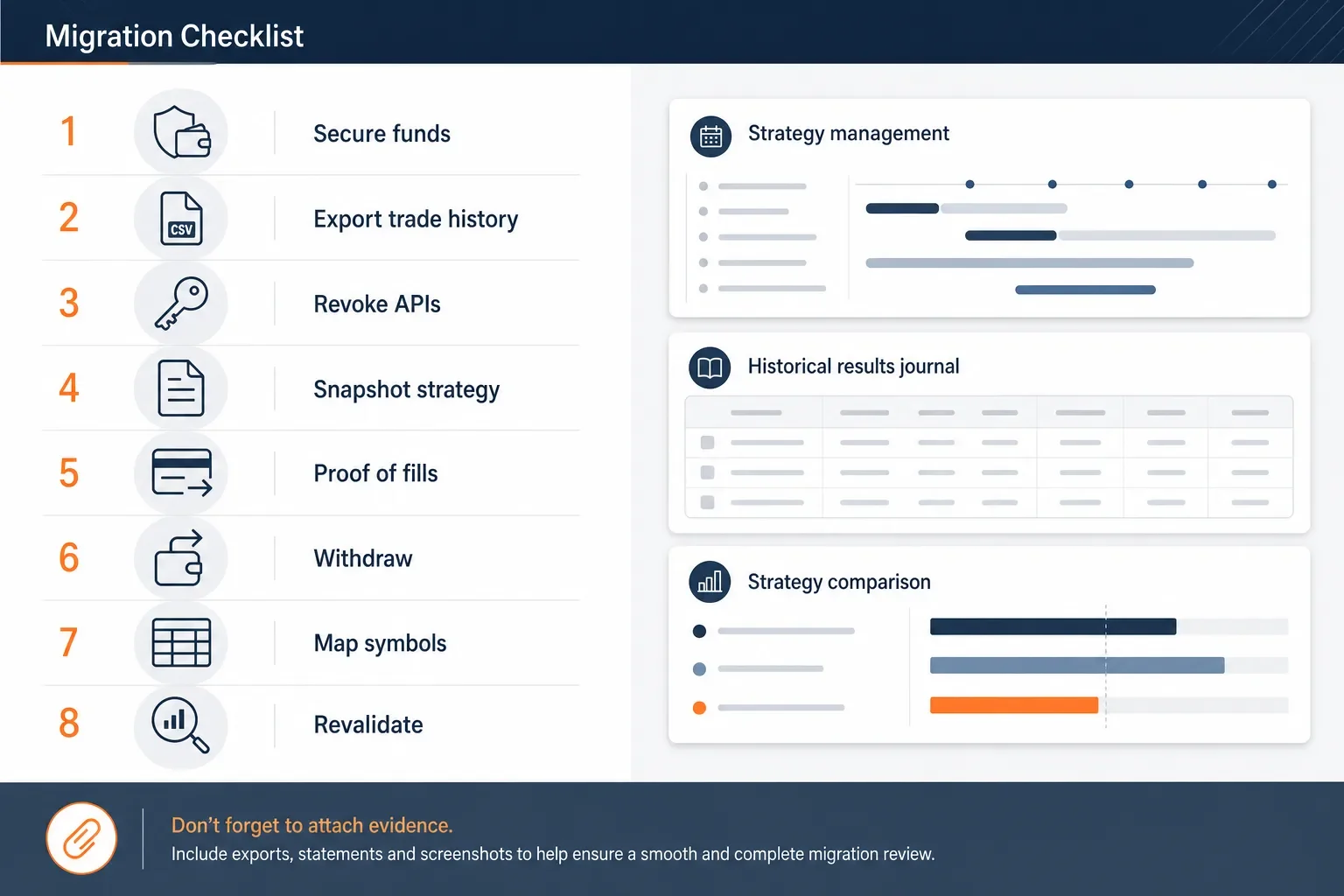
1. Secure funds
- Check balances and confirm whether withdrawals are still available. Prioritize wallets with noncustodial withdrawal options (spot, margin, or crypto wallets).
- If withdrawals are open, initiate transfers to a secure exchange or a cold wallet you control. Prefer small test withdrawals first to confirm addresses and chains.
2. Export all trade and withdrawal history immediately
- Download trade history, order history, and withdrawal/deposit logs as CSV or PDF where available.
- Capture screenshots of any open orders, margin positions, or ongoing financing lines.
3. Revoke API keys and remove linked apps
- If you have API keys on BitMart, revoke them after exporting required data. Remove API credentials stored in external tools or credential managers.
4. Snapshot strategy configurations
- Export or copy your strategy rules, triggers, symbol lists, and position sizing settings. If your strategy definitions live in multiple places, collect them into one document.
5. Document proof of fills and settlement
- Save transaction IDs, timestamps, fees and order IDs for each trade. These will help you reconcile fills on new venues and support audit trails.
## Detailed step‑by‑step migration checklist
### Step 1 — Export everything that proves execution and settlement
- Trade/Order History: CSV or PDF exports that include timestamps, side, price, size, fees and order IDs.
- Wallet Activity: Deposit and withdrawal transaction records.
- Account Statements: Monthly or daily statements, if available.
- Screenshots: For anything that cannot be exported, capture full-screen screenshots showing timestamps and balances.
Why: Reconstructing P&L and verifying fills depends on accurate timestamps, fees and order IDs.
### Step 2 — Verify fills and reconcile balances
- Cross‑check exported trades against on‑chain withdrawal TXIDs (for crypto withdrawals). Use a block explorer if applicable.
- Reconcile ending balances: starting balance + deposits − withdrawals + P&L = ending balance. Flag any discrepancies.
Practical example: If you see a withdrawal of 0.5 ETH in BitMart’s withdrawal CSV, verify the corresponding TXID using Etherscan to confirm on‑chain settlement.
### Step 3 — Withdraw funds safely
- Prefer destinations you control. Use known, whitelisted addresses. Confirm the network (e.g., ERC‑20 vs a layer 2) with a small test transfer first.
- Check withdrawal fees, minimums and potential processing queues. If BitMart imposes limits or delays, prioritize assets that are riskier to leave on the platform.
Important: Do not assume instant settlement — plan for confirmation times and possible rate limits.
### Step 4 — Preserve strategy history and assumptions
- Collect your strategy rules and assumptions (entry/exit logic, position sizing, risk limits, slippage and fee assumptions).
- Use Trade Strategy’s Strategy management feature to record and organize each strategy’s rules and assumptions. This creates a single source of truth for later validation and comparison.
Why: Having documented rules helps you map historical trades to strategy logic and makes re‑validation faster on new venues.
### Step 5 — Record historical trades into your journal
- Manually create entries in Trade Strategy’s Historical results journal for the exported trades. Include timestamps, fill prices, fees and any order notes.
- Attach the original CSVs or screenshots as supporting evidence to each journal entry where possible.
Practical tip: If the platform you migrate to uses slightly different tickers or symbol formats, store the original exchange symbol in the journal entry so you can trace trades back to their source.
For now, import exported CSVs manually and keep original symbols in your records for traceability.
Trade Strategy provides Strategy management, the Historical results journal, and Strategy comparison to help document rules and record historical results. For product updates, check https://trade-strategy.com/blog.
### Step 6 — Map symbols and markets
- Build a symbol mapping table that lists: old exchange ticker, new exchange ticker, market type (spot, margin, futures), and quote currency.
- Watch out for differences in ticker formats (e.g., BTC_USDT vs BTCUSDT), perpetual contract suffixes, and quote currency changes (USDT vs USD).
Example mapping row:
- BitMart: BTC_USDT (spot) → New Exchange: BTCUSDT (spot)
Why: Accurate symbol mapping ensures historical P&L aligns with new venue data and prevents misattribution in your performance reports.
### Step 7 — Revalidate strategy assumptions on the new venue
- Re‑run backtests or paper trades with venue-specific adjustments: typical spreads, liquidity, order book depth and slippage assumptions.
- Compare pre‑migration results (from your Historical results journal) with initial post‑migration executions.
- Use Trade Strategy’s Strategy comparison feature to benchmark saved strategies and historical results side‑by‑side.
Caveat: Market microstructure differences can materially affect short‑horizon strategies. Treat early results on the new venue as provisional.
### Step 8 — Post‑migration housekeeping
- Update documentation and internal runbooks with new exchange details and any changes in symbol conventions.
- If you relied on third‑party tools for execution, update or rotate API keys and test connectivity in a sandbox or with small trades.
- Schedule a revalidation window (e.g., 7–30 days) to compare live performance against historical baselines.
## Example checklist (compact)
1. Export trade/order history + withdrawals (CSV/PDF) — NOW
2. Snapshot balances and open orders — NOW
3. Revoke API keys after export — ASAP
4. Withdraw funds to secure destinations — ASAP
5. Document strategy rules in Strategy management — 24 hours
6. Record trades in Historical results journal (attach CSVs/screenshots) — 24–48 hours
7. Create symbol mapping table — 24–72 hours
8. Revalidate strategies and compare with Strategy comparison — within 7 days
## What to watch for (common pitfalls)
- Symbol mismatches that silently misattribute trades to the wrong market.
- Fees and funding rate differences that distort short-term P&L.
- Partial fills and cancelled orders that are not obvious in summary exports.
- Assuming identical liquidity and execution quality across exchanges.
## Product notes
The released features—Strategy management, Historical results journal, and Strategy comparison—can help you document rules, preserve exported results, and compare strategies before and after migration. For product updates, check https://trade-strategy.com/blog.
## Conclusion
A forced exchange migration is operationally painful, but a deliberate, prioritized approach will preserve assets and the integrity of your strategy history. Start by securing assets and exporting all records. Then move methodically: document rules, record historical trades, map symbols, and revalidate strategies on the new venue. Use Trade Strategy to centralize documentation and compare pre‑ and post‑migration performance.
Read the full migration checklist on our blog: https://trade-strategy.com/blog
Disclaimer: This article is operational guidance, not financial advice. Follow your own compliance and custody procedures when moving funds.
 2026-08-11
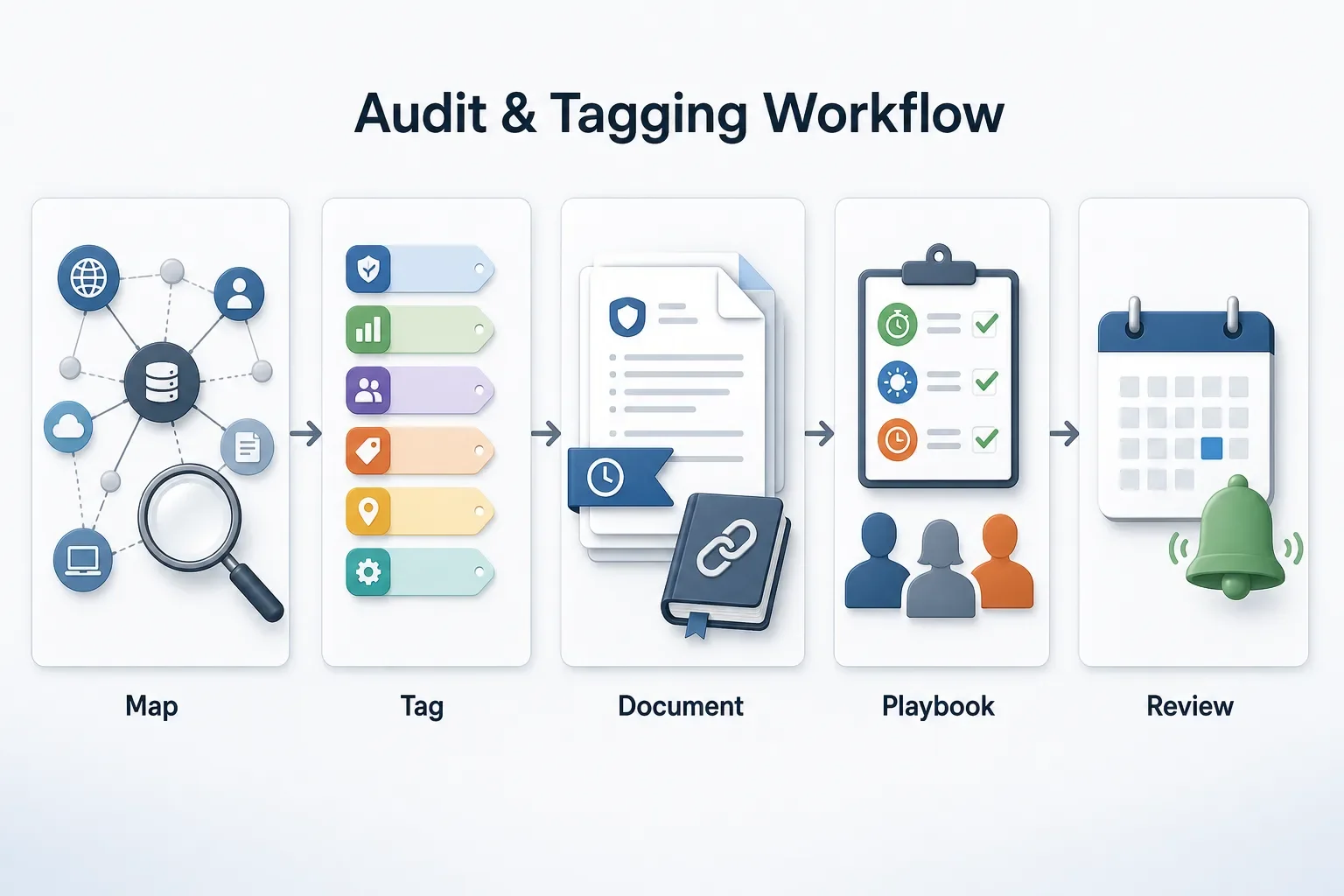
How to Audit and Tag DeFi Strategies for Regulatory Exposure
Practical, step‑by‑step workflow to map DeFi protocol touchpoints, tag regulatory exposure, preserve audit trails with documented rules and historical results, and prepare playbooks to respond quickly to enforcement events.
 2026-08-11
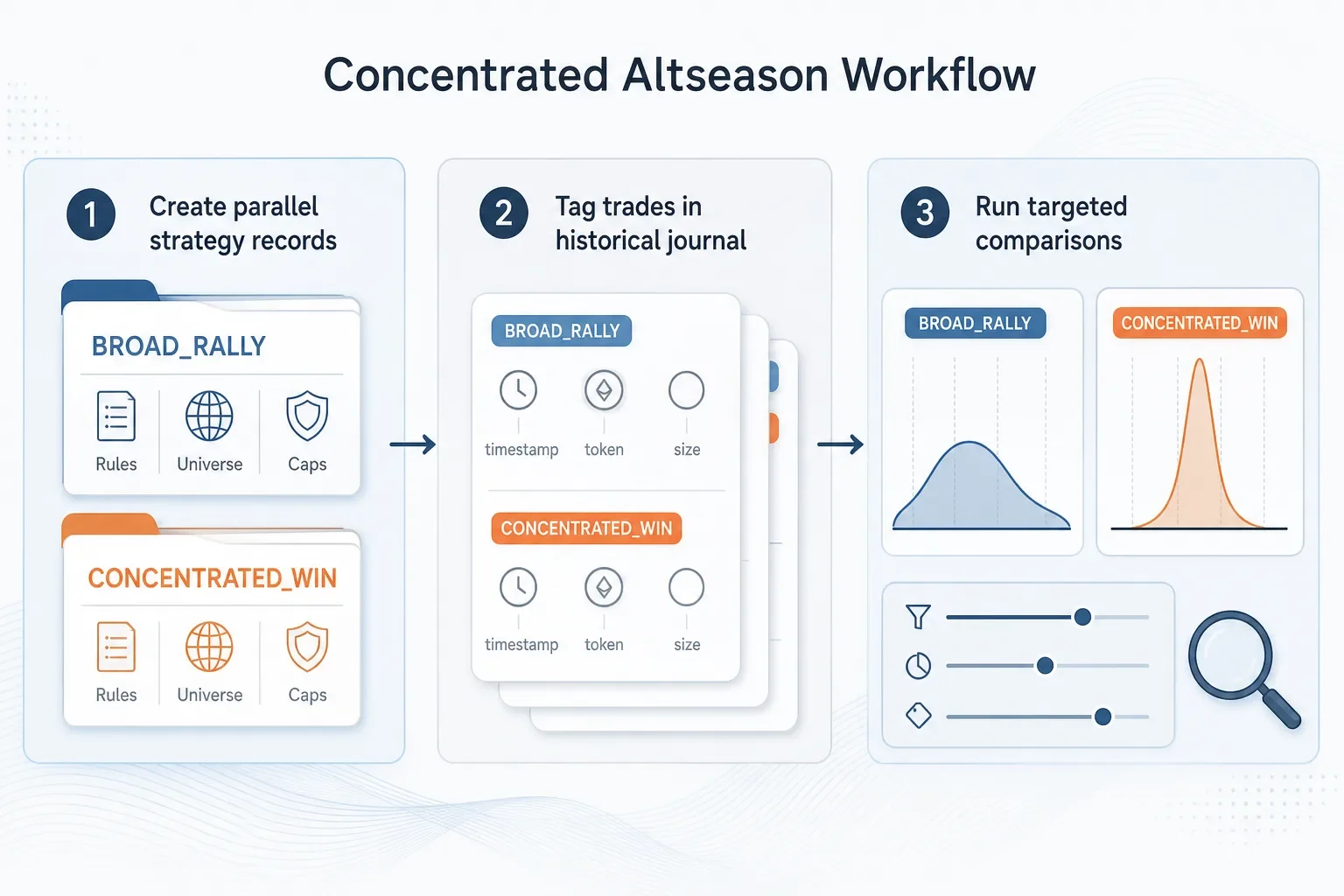
How to Adapt Your Strategies for a More Concentrated Altseason
Step-by-step workflow to adapt trading strategies for a concentrated altseason: create regime-specific strategy records, tag outcomes in a historical journal, compare results across token subsets, and apply concentration-aware sizing and monitoring.
 2026-08-11
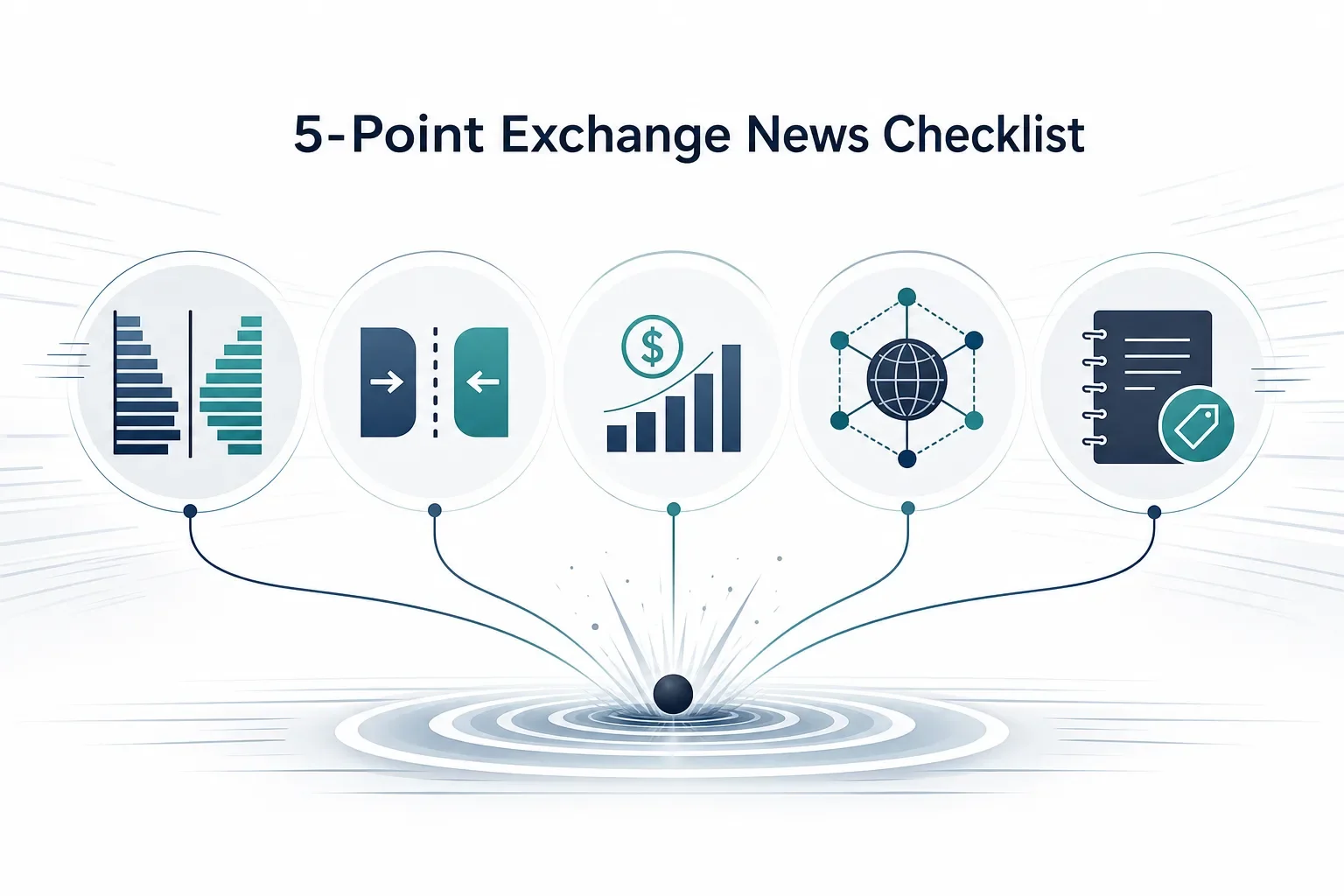
Exchange News Trading Checklist: A Practical 5‑Point Playbook
A fast, repeatable 5‑point checklist to assess liquidity, tag event trades, and stress-test strategy variants after exchange revenue misses or similar venue shocks.